Vista Fonts

The new fonts included with Windows Vista are called Calibri, Cambria, Candara, Consolas, Constantia, and Corbel, and even though you don’t have Vista you know you want them.

These are the new and improved fully finished versions. Update (March 31, 2008) If you want an official source for the fonts install PowerPoint Viewer 2007. The fonts will be automatically added to your Windows system. (Disclaimer: Read the legal fine print on Microsoft’s site for usage rights.)

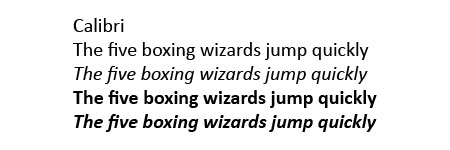
Calibri.jpg font sample
Wikipedia entry on Calibri.

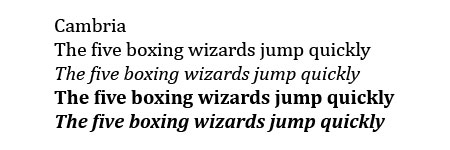
Cambria font sample
Wikipedia entry on Cambria.

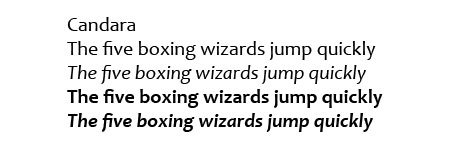
Candara font sample
Wikipedia entry on Candara.

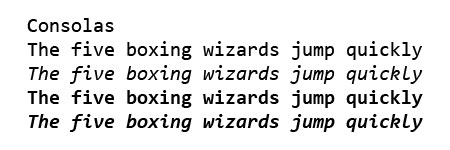
Consolas font sample
Wikipedia entry on Consolas.

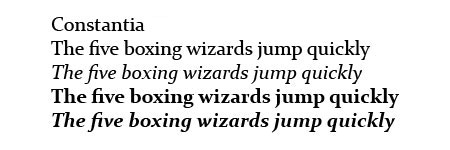
Constantia font sample
Wikipedia entry on Constantia.

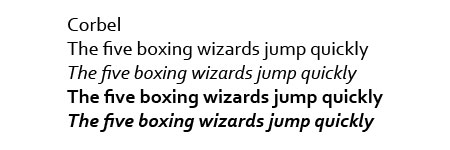
Corbel font sample
Wikipedia entry on Corbel.

Previously: Windows Vista Fonts Now Available and Microsoft Office Compatibility Pack.

Disneyland Resort Paris Freebies

The Disneyland Resort Paris music site is offering used to offer free downloads of music from the park. The songs are available for two weeks and then rotated.

I’ll be interested if they offer any music from the attractions themselves or just area music. A while ago I started searching for some Pirates of the Caribbean music, but so far my search has been unsuccessful. Hopefully I’ll be able to find it here. (Yup, I got them)

Remember that you’ll have to unzip the files and enter the password they give you (www.dlrpmusic.com) but the downloads are free. You can also find more downloads in the bonus section.

Oh, and a word of warning, they have background music that plays automatically, ala webdesign 1996, but at least there is a stop button to turn it off.

(Leave me a comment if you’re looking for these files, I might still have a copy somewhere)

iTunes Art Importer

One of the things I like about my iPod Photo is that I have the ability to link album artwork with my music files. One of the things I don’t like about it is that for someone like me that has a rather large music collection, it takes an awful lot of effort to add artwork to each song.

Luckily someone wrote a new application that automatically goes out and downloads artwork for each of your songs. I haven’t tried it yet, but I’ve read about it from a few different sources and it sounds to be a great program.

Check out the iTunes Art Importer.

Update: I’ve tried it and I love it!

Update: Macworld has a story from 2005 about this software.

I Heart Firefox

I love Mozilla Firefox! I just upgraded to their newest version and while I was at their site decided to download some extentions.
Update: None of these links work anymore.
Extentions are part of what makes Firefox so great. They add a little bit of customization to your browsing experience. These are the ones that I have and I recommend them all:

  • Stumbleupon 1.9991
    Stumble onto sites suggested by like-minded individuals.
  • Tweak Network 1.0
    Tweak your network settings making Firefox that much faster.
  • BugMeNot 0.6.1
    Don’t be bothered with privacy issues and the inconvenience of required registration. Sometimes you can even find passwords to sites you’d never expect.
  • BetterSearch 1.7
    See the sites you are searching in nice thumbnails before you click.
  • Disable Targets for Downloads
    Gets rid of those blank windows that sometimes pop-up when you are downloading binary files.
  • Tabbrowser Preferences
    Customize your tabbed browsing experience. I especially like the “open new tab” button.
  • ForecastFox 0.7
    Now you don’t have to look outside for the weather! Just look on the small icon at the bottom for all the weather information you need.
  • ColorZilla 0.8.2
    Featuring webpage zooming and eye dropper colour picking.

MSN Forcing Upgrade

A few days ago, when I tried to login to MSN an error message popped up explaining that “A newer version is available. You must install the newer version in order to continue. Would you like to do this now?”

I installed it, as I was forced to, but to my surprise the “newer version” was the same version I already had! Well whatever, it’s irritating but it’s no big deal — I guess. But what is irritating is that at school MSN asked me to upgrade again and this time I didn’t have admin priviledges so I couldn’t — now that’s frustrating.

I can’t wait for google to come up with an instant messaging program.

Update August 2005: Yay they have. Download Google Talk now!

Host File – There’s No Place like 127.0.0.1

Here is a copy of the host file that I use. (Right click Save As) and then save it over your old host file (making sure it has no extension). The old host file can be found at:

Windows XP = c:\windows\system32\drivers\etc
Windows 2K = c:\winnt\system32\drivers\etc
Win 98/ME = c:\windows

This file contains a list of web sites you’d rather your computer not bother to look up. For example a site that uses advertising from the DoubleClick advertising network would show it’s own content but not the ads if you had the line 127.0.0.1 ad.doubleclick.net in your hosts file.

The host file can also prevent tracking which sites you use. I can’t tell you what a big difference a good hosts file can make in your browsing experience. Find out more about host files.

Update: By default, if you try to modify your hosts file in Vista, it will not let you save it. It tells you that you don’t have permission. To successfully modify the hosts file, run notepad.exe as an administrator and open the file.

  1. Browse to Start -> All Programs -> Accessories
  2. Right click “Notepad” and select “Run as administrator”
  3. Click “Continue” on the UAC prompt
  4. Click File -> Open
  5. Browse to “C:\Windows\System32\Drivers\etc”
  6. Change the file filter drop down box from “Text Documents (*.txt)” to “All Files (*.*)”
  7. Select “hosts” and click “Open”
  8. Copy and paste the text from my hosts file into yours. Save and close Notepad.

The above instructions also work for Windows 7.

Also note that I try and update my hosts files from time to time so even though this post is old, the file may not be.