Subscribe now! It looks like this is your first time visiting jeffmilner.com. If you like what you see, click here to subscribe! Add to Google
Jul
30
Posted on 30-07-2005
Filed Under (download, typography) by Jeff Milner

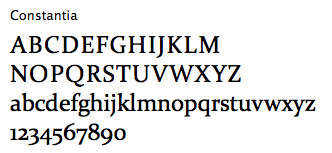
Windows Vista (formerly code-named Longhorn) will have six new fonts included when it is released next year. The fonts are called Calibri, Cambria, Candara, Consolas, Constantia and Corbel and are available for download. Constantia is my favorite.

(via tipmonkies)

Update (September 20, 2005): It appears that the download link above is not working. Try these links instead: Calibri, Cambria, Candara, Consolas, Constantia and Corbel.

Update (November 23, 2006): Microsoft has released a compatibility upgrade for older versions of Microsoft office, and within that package they have included finished versions of the new Vista fonts. I’m removing the old incomplete versions from my server now. See my post, Microsoft Office Compatibility Pack for more details and your link.

Update (March 4, 2007): Looks like the Microsoft Office Compatibility Pack has been removed, so I’ll just put my links back up. Update (March 31, 2008) It’s back up.

Update (October 2, 2007): The fonts have been out of beta for a long time, but the versions here are incomplete. Check out the new and improved versions.

Update (March 31, 2008) I’ve been asked to take the links down. Luckily Microsoft is still offering the fonts on their website, so find them there.

    Read More   Subscribe to Comments   

242 Responses to “Windows Vista Fonts Now Available”

  1. Michael says:

    Thanks very much for providing this……PS Your consolas link has a typo, so it doesn’t work easily.


  2. Jeff Milner says:

    Thanks for pointing that out Michael. Everything should be working fine now.


  3. Lt.Col.Claymore / Albert says:

    This is Sweet!!!
    Maybe not wanted by Micro$oft but they will hardly suffer form this !

    this is better then Ripping the Betá or Cracking the Original!


  4. Eric says:

    Wow, these are great! Thanks!


  5. CyberBhai says:

    Thanx for posting the Fonts


  6. Nicholas Bodley says:

    Many thanks for those! I hope you don’t get Slashdotted.They look superb, as good as those from Adobe. (Betcha Adobe had a hand in designing them.) If you had BitPass (the micropayment system) set up, I’d gladly help with your Web costs.

    I’m no MS fan, but their typography is excellent, on the whole.

    As well, they are (so far) about 1 MB apiece. Broadband is a delight, as usual.

    Anyone for setting up a BitTorrent?

    ===

    Albert’s message was amusing; not sure whether all the deviations from standard usage of our language were a parody, but I assumed they were. Nevertheless, I’m with him that they are sweet!

    Regards,
    nb


  7. Jeff Milner says:

    Thanks Nicholas.

    I don’t think I’d feel comfortable taking pay-pal payments for something that I didn’t create. I do appreciate the thought though. Currently the ads I have around the site are helping with my hosting costs. (They help more when they get clicked on.)


  8. Nicholas Bodley says:

    When I did a mouseover [on] the link to Consolas, the tooltip sometimes gave the filename “Constantia”, and I started to download that file, instead. Took several tries before I could get “consolas.zip”. Bug in the Web page code, maybe? (Using Opera 8.51, Build 7720, on 98 SE)

    Curious to know whether these are OpenType, and whether they can be used in W2K (or even 98 SE), or Linuces. Not asking for a reply; I’ll find out.

    Thanks, again!

    Btw, to send another comment, I needed to close and re-open this page. Keeps your visitors from spamming you with messages, seems to me!

    Regards, nb


  9. Jeff Milner says:

    That’s really weird about the mouseover problem because the code looks good.

    As for the fonts, they are TTF (true type). You shouldn’t have any problem using them on any system that supports True Type.

    WordPress is good for preventing spam actually making it to the posts through moderation, but I was playing with the code to prevent specific spammers from repeatedly sending me the same junk. I hope I haven’t made it more difficult for legitimate posters.

    What I’ve figured out from my experience with the spammers is that the same spam is coming from a lot of different IP addresses from all over the world. This leads me to believe it’s zombie computers that don’t even know they are infected that are spamming me. It’s hard to know for sure though.


  10. Ulixes says:

    Thanks for hosting.
    Here there are some suggestions for more coding fonts:

    http://www.codinghorror.com/blog/archives/000356.html


  11. Nicholas Bodley says:

    Munged my archive partition, so I can thank you twice(!) :) for making these available. Indeed, many thanks!

    Something’s wrong in Opera 8.5 when I try to download Consolas; I get Constantia, and the tooltip also shows that. displayed source, got the URL, and pasted it into a new [tab]. Might be a bug at this end.

    Best regards, indeed!


  12. Nicholas Bodley says:

    Woops! Sorry! I see I left a message, last time, about the oddness re Consolas.

    Regards,
    NB


  13. Hyunjong Park says:

    Thank you so much!

    So Sweet!


  14. piotrek says:

    tx :)


  15. Curt says:

    Great find, I’m in love with Corbel.

    Very interested to know why each starts with the letter “C” though? Sure, it could be coincidence, but it’s too much of a coincidence.


  16. kucheeng says:

    Thanks :)


  17. edd says:

    thanks - ive been to about five websites so far and yours is the first to actually have the fonts downloadable!


  18. Jen says:

    Thank you for these! I run OS X and I’m glad to have the fonts :)


  19. michael says:

    thanks for the download… Consolas is hot. although a few punctuation marks are a bit weird… what’s with that question mark? it looks flippant to me… or sly or something.


  20. jmgriff says:

    Great! Thank you. I would have to agree with Constantia being a fav.


  21. rebecca says:

    thanks!


  22. mericson says:

    Thanks for the link, much appreciated.


  23. David says:

    I’d like to add my thanks for making these fonts available. Some of them are among my all-time favorites, especially Calibri and Constantia. The only problem is that Constantia is unfinished. There are no numbers and some of the other punctuation marks and symbols are missing in italic and bold, making usability quite limited. Wonder if there has been an update?


  24. Jeff Milner says:

    Hey David and everyone that has commented. It’s nice to have a few posts that continue to get a lot of comments (posts that are unrelated to backmasking anyway).

    As for your question about updates, I’m not aware of any at the moment, but if someone knows about a newer version of these fonts, then please, by all means, let me know.


  25. Leto says:

    Hey, thanks a lot for the fonts! I really wanted to have the Consolas one.


  26. Justin says:

    First, thanks for offering these.

    Second, there’s something odd with Constantia: When I italicize it, some common characters like numbers turn into placeholder glyphs (a spiral, in this case). I assume this is because the font is incomplete as offered.

    Do you know where a more updated version of Constantia is?


  27. bbrother says:

    Thanks, was looking for these fonts but indeed the links were gone.
    Thanks for providing the downloads ;)


  28. LiraNuna says:

    Those Fonts are great! Thanks for sharing :)


  29. Zara says:

    Thanks, Jeff! I was really hoping to check out Calibri, since I’d read elsewhere that this was to be the new default font in Office 2007 (replacing Times New Roman).


  30. DZ says:

    You are a hero! Providing the font downloads where others have failed.

    Kudos!


  31. sangtan says:

    Thank you very much for downloads. I searched around and found it here.
    I am going to try them out.


  32. AKX says:

    Thank you!
    Though I have the feeling a certain Redmond based company will request removal of those files shortly, as has been the case with others :/


  33. Zasdad says:

    Thanks, Jeff. Your post is the top position for the calibri .zip Google search! Perhaps that explains why Mister Softee hasn’t come calling yet…


  34. J says:

    My friend, you are a genius. Well done and thank you very much!!


  35. WH says:

    Thanks!!


  36. Eklektikos says:

    Thanks for hosting these. As noted above, Constantia is unfortunately defective, missing characters in its italic fonts. But Consolas is the sweetest monospace font I’ve seen yet — tremendously readable, and easy on the eyes, at least with ClearType on.


  37. Erik says:

    Thanks a million. I’ve been looking all over for those fonts. More, more, I’m still not satsified.


  38. Shawn says:

    Thanks so much. I’ve had a heck of a time finding any of these other than the consolas. Cheers!


  39. steve lam says:

    thank you!


  40. john doe says:

    tnx mate


  41. satori says:

    Thank you so much…
    it is simply fantastic…
    and you are genius…

    xxxxxx


  42. el says:

    Thanks for this, it allows us to use these fonts already, without having to install Office 2007 Beta on every computer


  43. greg says:

    thanks for providing links! much appreciated!


  44. David says:

    thanks! The Consolas installer on Microsoft’s download site worked on my other machine, but not this one.


  45. Kieran says:

    Thank you


  46. Jim says:

    Thanks for the links.


  47. Vyse says:

    thx a lot for the fonts!


  48. MPR says:

    Thank you for hosting this!


  49. Al says:

    Thanks for these!


  50. Dennis says:

    Thank you for hosting these, from the bottom of my eyes!


  51. wayne says:

    Thanks for the fonts. You star.


  52. Ravi says:

    Thanks buddy!!! for posting this fonts.


  53. Ray says:

    Thanks man for the fonts. Much appreciated.


  54. Doug says:

    Thanks — I really appreciate you posting these fonts.


  55. MR says:

    Thank you SOOO much for the dl links.


  56. Kevin says:

    Thanks for the links! I love these new fonts and have been looking everywhere for it!


  57. Scott says:

    Thanks for posting these up. I hope to start using them soon.


  58. Alijsh says:

    Thanks for letting us have these fonts. Can you also make “MS Uighur” available? It’s said to be the best ever created font for Persian. Thanks in advance.


  59. chris says:

    Hey, thanks for this download… I love the new Vista fonts and am anxious to start using them


  60. skolima says:

    Thanks!


  61. SvKane says:

    Thaks a lot. Love it.
    Used once in Office 2007, but never saved them for me.
    Cannot imagine how happy this makes me.
    Thanks a lot.


  62. m says:

    thanks!


  63. Ian Thomas says:

    Thanks! I’ve been trying to use the new fonts dynamically in my site, but haven’t been having any success, so this is a useful link.


  64. Jace says:

    Was looking to redownload these for my new machine. Thanks!


  65. mujahid7ia says:

    Thanks a lot for hosting!!


  66. zzabirr says:

    Thanks a lot for hosting!!


  67. matt says:

    I’ve been looking for those since days. Thanks!


  68. michael says:

    nice job man. you got your comment. lol


  69. steve says:

    i had to reformat my computer recently, and i backed up everything but my fonts folder, where i put the fonts after i installed them, and no i dont have my pretty new vista fonts anymore.
    but thanks to you i do!
    yay for you.
    many thanks and goodnight!


  70. Jitendra Madhav says:

    When i use these fonts in Photoshop 7.0, it throws “Prgram Error”…


  71. Jitendra Madhav says:

    do u know which font is used in Microsoft homepage images and headers of inside pages?


  72. Laurel says:

    Thanks a ton for hosting these. I’ve been looking all over for them…


  73. Andrew says:

    Cheers mush!


  74. Danoot says:

    Thanks for this. I recently had my laptop die, and one of the things I was most worried about (seriously) was that I wouldn’t be able to get these fonts back…


  75. Marek says:

    gal anonim


  76. def says:

    These fonts are really great and thanks a lot for hosting them.


  77. ojc says:

    Thanks for the hostage. I owe you one.


  78. Terry says:

    Hmmm…


  79. Kevin says:

    Thanks for the fonts. Any word on whether they’re going to be changed any for the latest release candidates / final version?


  80. Paul says:

    Thanks for the fonts.


  81. Magda says:

    Here goes my thank-you, all the way from Brazil!


  82. Rowland says:

    Thank you for these fonts, I think these are the best fonts I have ever seen!!!


  83. Hugo says:

    Updated version of Constantia and the other Vista fonts.

    To replace the defective Vista fonts still present at older
    download addresses by corrected versions, simply download
    Microsoft Office Compatibility Pack (O2007Cnv.exe) from
    http://www.microsoft.com/office/preview/beta/converter.mspx
    From this extract ‘O12Conv.cab’ and then extract six of
    the ‘Visa Fonts’ in their current (1.0-)versions.


  84. janer says:

    Thank you for these fonts, I think these are the best fonts I have ever seen!!!
    http://www.uli-design.wz.cz


  85. rtioert says:

    thanks for the fonts!


  86. darynar says:

    any chance of getting this links up and going again?


  87. Jeff Milner says:

    I checked the Microsoft link and it looks like it no longer works (at least not as easily as it once did). So I’m putting the font links back up.


  88. moovyphreak says:

  89. dennis says:

    thnx 4 the fonts :)


  90. Rick says:

    Thanks for making the new Vista fonts available!


  91. Nikki7 says:

    Great! By the way do you know if it can be used on a linux machine?


  92. Jeff Milner says:

    It looks like true type fonts will work in at least some versions of Linux. Check out the google search Linux true type fonts.


  93. Cristina says:

    Thanks for the fonts!


  94. Shawn says:

    Thanks so much for hosting these fonts; my laptop died, and all I have out here in the middle of nowhere was my XP reinstall CD. I can’t live without my Calibri!


  95. Troy says:

    Thanks for doing this! I’ve been looking to a way of getting these without doing the whole M$ thing. On another note, anybody know where I can find Segoe UI?


  96. Dylan says:

    Thanks mate, lets check em out on OSX


  97. Dude says:

    sweet fonts. me likey. thanks.


  98. Picto says:

    Thanks for making these fonts available. I love calibri and didn’t know about the others but I’m loving them all now!


  99. Cath says:

    I was inspired by a podcast on web typography to check out these fonts. Never had a reason before to pause to think about Vista, but here it is. Thanks for letting me see these fonts on my very own machine :)


  100. Mark says:

    Many thanks for hosting these Jeff. They look really good. I wonder how effective they will be in allowing users to read large sections of text straight from the screen.

    We are looking at ways of marking assignment submissions online rather than printing them all out. The fly in the ointment is that most assessors don’t like reading straight off the screen.

    Cheers

    Mark


  101. My Name says:

    Billions of thanx to you Jeff! Leaving you my comment as you asked ;)


  102. ajree says:

    Thanks Jeff! You saved me from switching back to my long forgotten winXP desktop.


  103. timmy says:

    hooray for jeff :)

    thanks for the links, i have 2007 on my laptop, but here in the office its still 2003. and it just doesnt seem right typing with these old fonts when i know there’s something better :D

    thanks again :)


  104. gushil says:

    Great stuff jeff. Like to use it everyday.

    thx, keep up the great work ;)


  105. grace galang says:

    Thanks Jeff Milner for this free link. i enjoyed using them on my mac. it fits perfectly.


  106. Neue Schriften in MS Vista says:

    [...] B. bei der Nutzung von PDAs. Wer jetzt schon mal einen Blick darauf werfen möchte, sollte bei Jeff Milner dot com vorbei schauen. Zum Download nicht den »Downloadlink« nutzen, da dieser nicht [...]


  107. abhijeet says:

    Thank you very much! Good fonts!


  108. Chris says:

    Thanks for the hosting. Conselas looks really nice in my ssh sessions.


  109. ahamed says:

    Wow!

    Thanks a lot, man! The fonts are awesome!

    Friend, you rock!


  110. James says:

    Appreciate the fonts, Jeff. Thanks for doing this.


  111. leonardus says:

    Hey thanks for the new fonts….. I didn’t want to install PPT viewer for these fonts only.

    Thanks….
    Ciao.


  112. Ryan says:

    Thank you for the fonts :)


  113. Toe says:

    The web needs more people like you ! These fonts are really nice. Thanks a lot.
    Merci beaucoup…


  114. Daniel says:

    Awesome! Fonts look great on my Macbook. For OS X users, just go to “Font Book” and click File -> Add Fonts, then you can shift select them to add. There are four files each, corresponding to ‘Regular’, ‘Italic’, ‘Bold’, and ‘Bold Italic’. Just add them all, it works great!


  115. Pamela Leong says:

    I am eternally grateful. Calibri is my font and looked high & low for it in vain until now.

    Blessing upon your kind generousity.


  116. Gun-Food says:

    Windows Vista Fonts Mirror:
    http://www.aufwaerts.de/vista_fonts.zip (all in one package) No bandwidth limit.


  117. Code says:

    Jeff…blessings on you. Thank you so much. These fonts are rockin’!

    ~Code


  118. Will says:

    Thanks a lot for these, looking for some alternative to Times or Arial for my dissertation, think these may be the ones!


  119. Iggi says:

    Thanks a lot!


  120. Kim says:

    THANKS!


  121. Ali says:

    thank you so much!!! the best!


  122. andy websdale says:

    Thanks for supplying these links


  123. mayland says:

    Thanks *very* much for hosting these links. Cheers!


  124. Kaneda says:

    Thx a lot !!!


  125. BillN says:

    Thanks for the fonts!


  126. JackBoo says:

    Thanks you so much.


  127. links for 2007-05-19 « Kaigani’s Arbor Vitae says:

    [...] Jeff Milner dot Com » Windows Vista Fonts Now Available Direct download of the vista fonts — follow the font name links, not the ‘download’ link (tags: fonts free vista) [...]


  128. AjitR says:

    This is incredible. I have been searching for the font that matches the typeface of the HBR and finally found it! Thank you so much for providing the link.


  129. dbldbl says:

    thx for the fonts, will give these a whirl on my mac powerbook…


  130. Olivia says:

    Thank you very much, Jeff! I love the Calibri font - it’s so cute!


  131. David says:

    For myself and other Mac users, thank you, thank you, thank you! for providing these.


  132. Orges says:

    Hi Jeff

    Thank you for providing an option to dl this wonderful fonts.


  133. Loveswing says:

    Thanks so much for providing these fonts. What a bah-gain.


  134. Pratik says:

    Thanks.


  135. Tanya says:

    Great Job buddy, was looking all over for it and your the best., Thank you once again.


  136. Kevin Brooks says:

    Quite like the calibri. I have poor vision - just bought a 19″ LCD monitor, and was looking for a font to use with it. Thanks for posting it.


  137. Mark says:

    Thanks alot for providing these fonts for us. Had Vista for a while, but my pc wouldn’t handle it. Really missed the fonts though so I’m glad I found them here. Thank you.


  138. New USer says:

    Jeje, Incredible fonts!!!!


  139. Mark says:

    Thank you so much!


  140. Torie says:

    A thousand thanks for the fonts good sir!


  141. Harry says:

    I ended up ditching Vista due to drive compatability but missed these fonts. Thanks!


  142. Vista Schriften « typoblog.ch says:

    [...] > Link zu Download für Microsofts C-Schriften als Truetype [...]


  143. dwees says:

    Thanks very much for this download. I’m collaborating with someone on a book, and they are using Windows Vista, with Office 2007.

    Dave


  144. DrLocke says:

    How to say thanks strong enuf–we’re under the gun to finish a white paper. The client wants only Calibri. Yours is the only working source.


  145. Cloudyjoe says:

    Absolutely brilliant that a Mac user can download and install these new fonts so easily. There doesn’t seem to be any other source except yours. Is there any chance of the expert set or the maths set becoming available?


  146. sam says:

    Thanks! just had to move back to xp from vista after a job change… so these are handy to have that good ol feeling back


  147. Lot says:

    thanks i did’nt know this fonts are packaged with windows vista til now,
    thanks for the info too


  148. ScottBruin says:

    Thanks so much!


  149. Rob says:

    Many thanks. I just heard about the new fonts today, along with a note suggesting that one way to get them is to download the PowerPoint 2007 viewer. I suppose that works, but the EULA for that says it can only be used with documents created by Microsoft Office (!?). The heck with that noise!


  150. Crown says:

    Thanks a ton! I love these fonts!


  151. eruntale says:

    thanks for the fonts, they are awesome!


  152. dire says:

    thank you so much!


  153. Suzi says:

    Thank you so much! I don’t have Vista yet, but have wanted these fonts for a while and now your information showed up in a search!


  154. Bruce says:

    Hi Jeff,

    Thanks very much for making the new Vista fonts available. I was keen to check out the fonts after reading this article:

    http://www.poynter.org/content/content_view.asp?id=78569

    Anyway, to provide you with something that you may find useful, I want to give you a link to a website that may help you improve your blog, or, if you are interested, perhaps even some of the different areas of your life. You may or may not have heard of this website, but I highly recommend you check it out:

    http://www.StevePavlina.com (aka ‘Personal Development for Smart People’)

    If you’re looking for some specific articles for improving your blog, you may find the following articles from the website useful (especially if you’d like to make your hosting costs a little easier)l:

    - http://www.stevepavlina.com/blog/2006/05/how-to-make-money-from-your-blog/
    - http://www.stevepavlina.com/blog/2006/01/how-to-build-a-high-traffic-web-site-or-blog/

    (There are other blogging related articles, but to my knowledge, those two are the most popular and have loads of practical advice.)

    Additionally, I read earlier that you didn’t feel comfortable with your readers making donations to you for content you didn’t create. I can understand where you are coming from, but there are more empowering ways to look at it.

    For example, why not accept donations for your effort in providing the information/resource in the first place? Why not put some of the money towards hosting fees, and donate the rest to a worthy cause (charity, invest in something, etc)? Why not upgrade your web server so your website is super-fast and responsive for your visitors?

    If you don’t want the money for yourself — if you don’t want it to flow “to” you — let it flow “through” you instead to those who can use it or benefit from it.

    If you’d like a bit more reading on this subject, these articles should prove useful:

    - http://www.stevepavlina.com/blog/2006/07/installing-empowering-beliefs/
    - http://www.stevepavlina.com/blog/2006/11/manifesting-intentions-without-resistance/
    - http://www.erinpavlina.com/blog/2006/12/getting-paid-for-spiritual-work/

    (You may find the last two articles there a little strange, but they do address common resistance people have with the financial side of their life. Try to focus on the useful ideas in the articles and the things that you find useful, and just forget about whatever you find overly “weird” or not useful.)

    Hope you find those resources useful.

    Regards,
    Bruce


  155. Bruce Davison says:

    Here is the new link for the Microsoft Office Compatibility Pack for Word, Excel, and PowerPoint 2007 File Formats -
    http://www.microsoft.com/downloads/details.aspx?familyid=941B3470-3AE9-4AEE-8F43-C6BB74CD1466&displaylang=en


  156. Skull_Commander says:

    Very nice, thank you :D
    The Calibri fonts is nice to read, but for the other fonts, I can’t give a comment since I haven’t check them yet ^^;;


  157. Ivan says:

    Thanks for the font


  158. Jonny says:

    Thanks you, i needed


  159. Alfonso Avila says:

    No hablo ingles pero la neta GRACIAS andaba buscando esas FONTS.

    Thank you.

    The Calibri Font i love it.


  160. David Bell says:

    Hi Jeff, thanks for providing those links. I’ve just used the Calibri font on my new site. I think it looks awesome. Thanks again.


  161. Felipe says:

    WOW… This fonts are very fantastic…Thanx


  162. top10 says:

    Well, as everybody here, I thank you very much for that link Jeff.


  163. M A Sridhar says:

    Thanks very much for hosting the fonts. I found your website through a Google search for Calibri.zip

    Thanks again.


  164. Temo says:

    Thanks for supplying these links


  165. ashraf khairalla says:

    thanks for this fonts


  166. Windows Vista Fonts « Websites and Life says:

    [...] 28th, 2007 at 9:49 pm (Design) Jeff Milner of Jeff Milner dot Com has links to download Windows Vista Fonts (works for both mac and [...]


  167. Eddie Cobain says:

    Many thanks 4 this site!!!


  168. nix says:

    What is the origin of these fonts? Something odd about them.


  169. AX Arevalo says:

    thanks for linking all the wonderful fonts! i appreciate these.